
Latest Version
1.5.106
July 26, 2026
nipahtv.com
Tools
Snipe & Chrome Based Browsers
1
Free / Proprietary
bjggmgekoncaaalaalhchepgkjoahjln
Report a Problem
More About NipahTV Browser Extension
What is NipahTV Browser Extension?
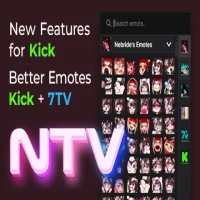
NipahTV is an extension designed to enhance the live chat experience on Kick. It unifies emotes from multiple third-party providers (including native Kick and 7TV emote libraries) directly into the Kick stream chat interface without requiring separate add-ons.
Key Features
Unified Emote Library: Access both native Kick emotes and 7TV global/per-channel emotes seamlessly.
Quick Emote Picker & Menu: Easily search, select, and send emotes using a clean, user-friendly menu.
Moderation Enhancements: Enhanced chat management capabilities with custom and upgraded Kick chat commands.
Message History: Quickly re-send or review recent chat messages.
Quality of Life Improvements: Includes custom chat message highlighting and interface performance optimizations.
Compatibility
Supported Browsers: Snipe Browser, Google Chrome, Microsoft Edge, Brave, Opera, and other Chromium-based web browsers.
Supported Platforms: Kick.com live streaming platform.
How to Install (.crx File)
Installing on Snipe Browser
Download: Click the download link to download the
.crxfile.Install: Open your browser's download menu and click on the downloaded
.crxfile—it will prompt to install immediately.
Installing on Chrome & Other Chromium Browsers
Download: Download the
.crxpackage file.Open Extensions Page: Open
chrome://extensions/in your browser address bar.Enable Developer Mode: Turn on the Developer Mode toggle switch in the top-right corner.
Install: Drag and drop the downloaded
.crxfile anywhere onto the Extensions page and confirm by clicking Add Extension.
Rate the App
User Reviews










Popular Apps








Editor's Choice
 Android
 iOS
iOS Windows
 Mac
Mac Linux
Linux Windows Phone
 PowerPC Mac
 Snipe & Chrome Based Browsers